LaTeX for a Résumé that Pops
Just a quick post so I'll never forget, or at least not lose the source, again :/
TL;DR #
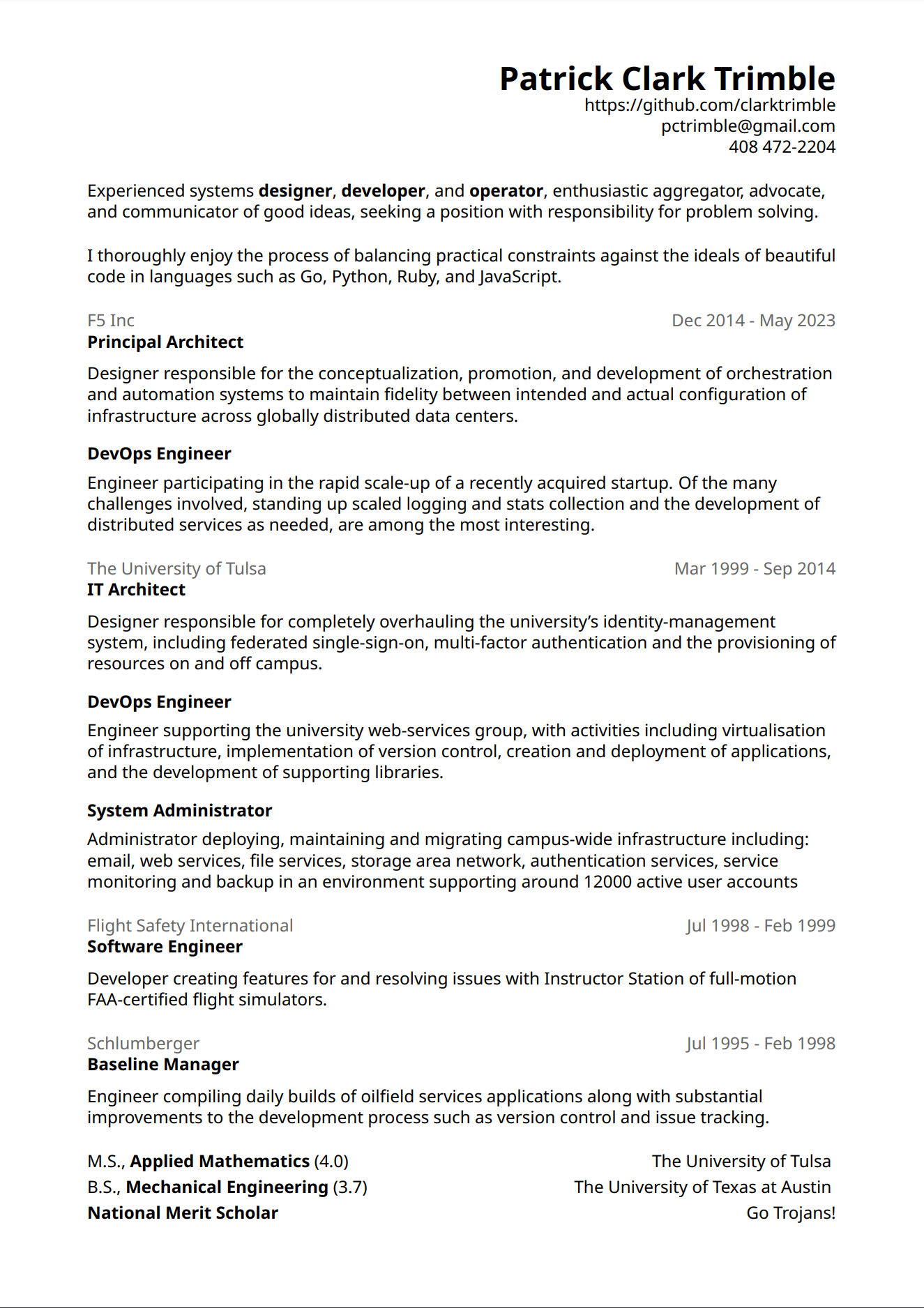
Source and the corresponding output.
LaTex ?? #
Pronounced LAY-tek. It can be used to turn markup into typeset documents, from a time when dinosaurs ruled the earth. I got my first taste of it writing my applied mathematics thesis. Totally indispensable for that kind of hairy symbolic stuff!
For a Résumé ?? #
Honestly, I don't know of a better option. Pardon my french, but "word processors" aren't really up to it (or we aren't at least) and the tidal-waves of templates out there are a shit-show.
With LaTex you can expect something that looks crisp and unique.
Have a look at some of the markup:
\begin{document}
\raggedright

\hfill \textbf{\huge Patrick Clark Trimble}

\hfill https://github.com/clarktrimble

\hfill pctrimble@gmail.com

\hfill 408 472-2204
\vfill

Experienced systems \textbf{designer}, \textbf{developer}, and \textbf{operator}, enthusiastic aggregator, advocate, and communicator of good ideas, seeking a position with responsibility for problem solving.
\vfill

I thoroughly enjoy the process of balancing practical constraints against the ideals of beautiful code in languages such as Go, Python, Ruby, and JavaScript.
\vfill

\textcolor[gray]{0.4}{F5 Inc \hfill Dec 2014 - May 2023}

\textbf{Principal Architect}
\vspace{7pt}

Designer responsible for the conceptualization, promotion, and development of orchestration and automation systems to maintain fidelity between intended and actual configuration of infrastructure across globally distributed data centers.
\vspace{11pt}
Really basic stuff in play here. Of course, it can get a lot more complicated, but for a one-shot, just tweaking the white space will get'er done.
LaTex Distributions #
Below, you'll see LaTex at it's most basic cli goodness. There are some good apps out there and they're probably the best for getting started.
Overleaf #
Overleaf looks pretty sweet.
Totally online, in the cloud, as-a-service! I definitely tried it at some point .. lol.
Texmaker #
Texmaker is the one I used last time.
It did a good job and I especially appreciated the solid, built-in package management.
TeX Live #
TeX Live is what I used this time.
Totally banging the cli rocks together here, but I just wanted to make some tweaks and get a fresh pdf.
Work Log #
Round One #
Install LaTex and turn the crank:
sudo apt install texlive
pdflatex clark-trimble.tex
Wvrmmmm .!!... cloink, frmppp; pdflatex failed with cannot find noto.sty.
How hard can it be to add one font? #
apt-file search noto.sty says texlive-fonts-extra but Debian wants to install a couple of gig's of stuff along the way.
I'm feeling upbeat, "I'll just pop that in my own-self and show them!"
CTAN (should have been my first clue?) has as nice package and the instructions are only a little daunting ...
Kinda looked like something good was happening, but pdflatex never found the noto.sty.
I tried just removing the font, but no, nice modern font is totally worth it.
Round Two #
Knuckle under to the wisdom of the package maintainers and turn the crank:
sudo apt install texlive-fonts-extra
pdflatex clark-trimble.tex
And, tadah!
Conclusion #
I'm into résumé minimalism and the LaTex is superb for that kind of thing.
- Previous: Encapsulated Environmental Configuration
- Next: FunHouse